
MySQL query commands most used by us
MySQL is an open-source widely used relational database management system that helps to deliver applications with high performance, and scalable web-based and embedded database applications to the customers. It is widely used as a database component of the software stack for a web application. This Database is used in Dupal like the must usually used database and is very powerful. It is based on a structured query language (SQL) and it will support and run on Linux, UNIX, and Windows.
This is a list of the must ussually commands used by us to develop tand maintenance database Drupal website using in the command line of mySql Server.
Log into mysql server in command line
$: mysql -u username -p
Create user and his privileges for database
mysql> CREATE USER username@localhost IDENTIFIED BY 'password';
mysql> GRANT ALL PRIVILEGES ON databasename.* TO username@localhost;
mysql> FLUSH PRIVILEGES;
Import an sql script file to the mysql database from LINUX command line
$: mysql -u username -p databasename < filename.sql
Export a mysql database from LINUX command line
$: mysqldump -u username -pPassword databasename > databasefile.sql
Change the user's password
mysql > SET PASSWORD FOR username@localhost = 'password';
Selecting users created
mysql> SELECT User from mysql.user;
mysql> SELECT u.User,Db FROM mysql.user u,mysql.db d WHERE u.User=d.User;
Delete all tables relationed with Drupal 8 caches tables inside mysql server.
mysql> TRUNCATE cachetags;
TRUNCATE cache_bootstrap;
TRUNCATE cache_config;
TRUNCATE cache_container;
TRUNCATE cache_data;
TRUNCATE cache_default;
TRUNCATE cache_discovery;
TRUNCATE cache_dynamic_page_cache;
TRUNCATE cache_entity;
TRUNCATE cache_menu;
TRUNCATE cache_page;
TRUNCATE cache_render;
Using pv to monitored the progress of command execution.
MySQL command line progress can be monitored using the terminal-based “Pipe Viewer” pv.
Importing database into my sql server from LINUX command line
$: pv </path/to/sqlfile.sql to import> | mysql -u USERNAME -pPASSWORD -D DATABASE_NAME
Exporting databse into sql file from LINUX command line
We need to estimate the file size of our export to get an accurate reading. This can be done via the information schema:
You must to run this command from mysql command line:
mysql> SELECT
    Data_BB / POWER(1024,1) Data_KB,
    Data_BB / POWER(1024,2) Data_MB,
    Data_BB / POWER(1024,3) Data_GB
FROM (
    SELECT SUM(data_length) Data_BB
    FROM information_schema.tables
    WHERE table_schema IN ('databasename')
) A;
You obtain the result of the command like this:
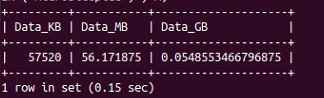
We then use the estimated size to track export progress:
$: mysqldump -uUSERNAME -pPASSWORD DATABASE_NAME | pv -s 56M > DATABASE_NAME.sql
Reset mysql root password in Mac OS
First Stop MySQL:
- Go to: 'System Preferences' >> 'MySQL' and stop MySQL OR,
- sudo /usr/local/mysql/support-files/mysql.server start
- sudo /usr/local/mysql/support-files/mysql.server stop
- sudo /usr/local/mysql/support-files/mysql.server status
Process to Reset MySQL Root Pass in Mac
- Make sure you have Stopped MySQL first (above).
- Run the server in safe mode with privilege bypass: sudo mysqld_safe --skip-grant-tables
- In a new window connect to the database, set a new password and flush the permissions (mysql -u root -p)
- For MySQL older than MySQL 5.7 use:
UPDATE mysql.user SET Password=PASSWORD('rootpass') WHERE User='root';
- For MySQL 5.7+ use:
UPDATE mysql.user SET authentication_string=PASSWORD("rootpass") WHERE User='root';
- Now flush privileges: FLUSH PRIVILEGES;
- Restart MySQL server.
Is possible thah on 8.0.15 (maybe already before that version) the PASSWORD() function does not work. In this case, You have to do:
- Make sure you have Stopped MySQL first (above).
- Run the server in safe mode with privilege bypass: sudo mysqld_safe --skip-grant-tables mysql -u root and run these command:
- Then return to mysql command line (mysql -u root ) and run this command to modify the user root password.
UPDATE mysql.user SET authentication_string=null WHERE User='root';

FLUSH PRIVILEGES;

exit;
ALTER USER 'root'@'localhost' IDENTIFIED WITH caching_sha2_password BY 'yourpasswd';
Beer Break!